
The AI browser is becoming the new front desk: what SMEs should control before assistants can act for the business
AI is moving out of chat and into the browser, which makes it much more useful and much more dangerous at the same time.
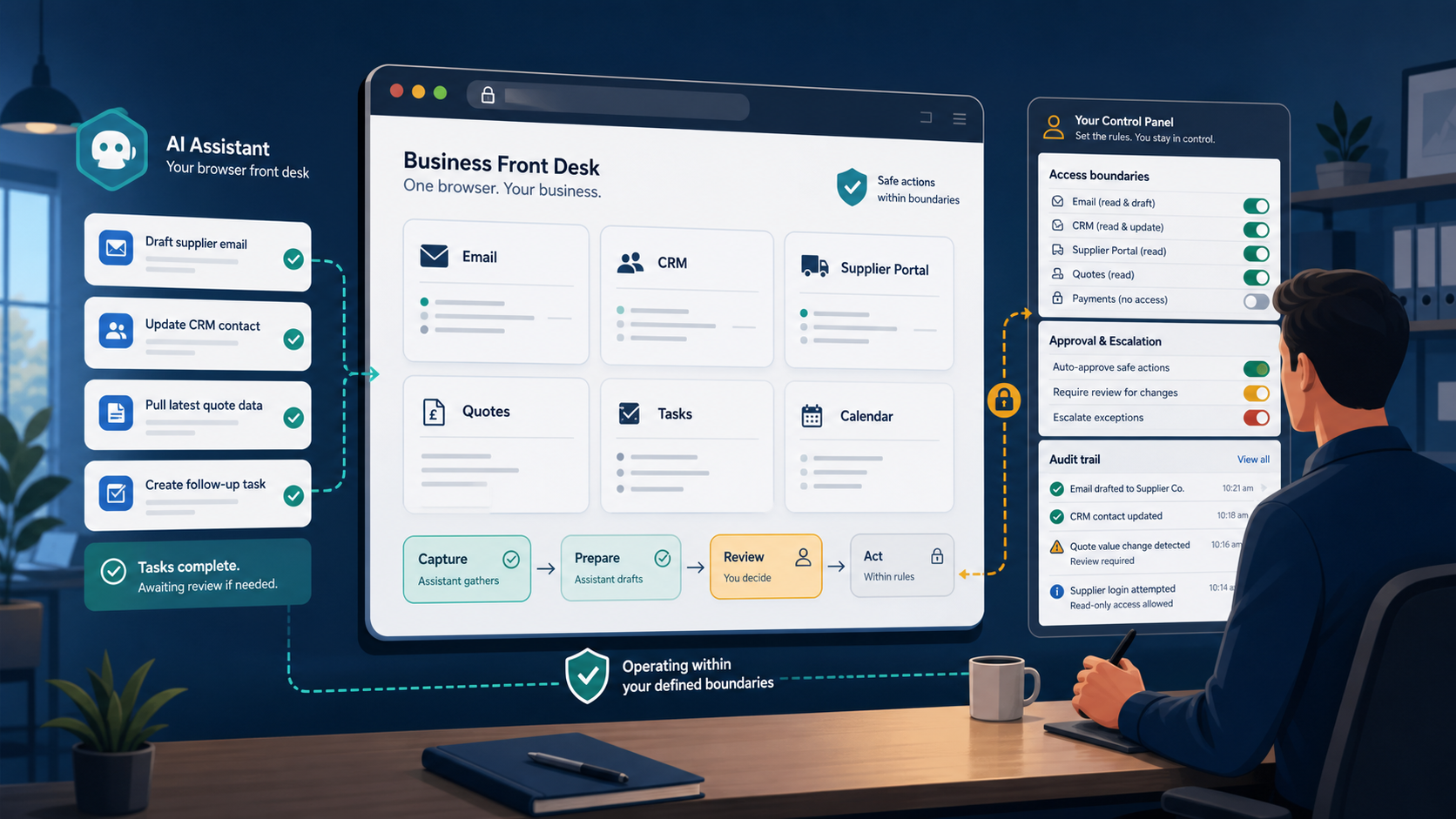
AI is moving out of chat and into the browser, which makes it much more useful and much more dangerous at the same time.
For SMEs, that shift matters because the browser is where work actually happens. It is where email gets triaged, supplier portals get checked, quotes get compared, CRM notes get updated, and internal tasks get handed off. If an AI assistant can act there, it is no longer just answering questions. It is touching the operating surface of the business.
The business case is straightforward: less admin, faster response times, and fewer handoff delays. The risk is also straightforward: wrong tabs, wrong records, accidental sends, and overreach into data the assistant should never have touched.
That is why the real question is not whether browser-based AI will arrive. It already is. The real question is whether the business has set the boundaries before it starts using the browser as a front desk for real work.
Why the browser is becoming the new front desk
Most small businesses do not run on one big system. They run on a browser.
The browser is where staff move between email, cloud storage, invoicing, CRM, project tools, supplier systems, booking pages, and internal knowledge. That makes it the natural first place for AI to become useful in a practical way.
It also makes it the first place where control matters.
A chat assistant can suggest a reply. A browser assistant can help select the supplier portal, pull the price, draft the response, and prepare the next step. That is a very different level of involvement.
The upside is obvious:
- less admin
- faster response times
- better consistency
- fewer repetitive lookups
- less time spent switching between tabs
The risk is just as obvious:
- wrong tabs
- wrong records
- accidental sends
- overreach into data the assistant should never have touched
If a business is going to use the browser as a front desk, it needs rules, not optimism.
Why browser AI is different from chat AI
Chat is useful because it helps people think. Browser-based AI is useful because it can help people do.
That difference matters.
Chat-based tools usually stay in the realm of drafting, summarising, and advising. Browser-based tools can interact with live business surfaces. They may see customer records, move between tabs, compare live information, or prepare actions that a human would normally perform manually.
That means the failure modes are more operational than conversational.
The business is no longer only asking, “Was the answer good?” It is asking:
- Did it touch the right record?
- Did it open the right page?
- Did it act on the right customer?
- Did it send anything externally before review?
- Can we see what happened afterwards?
That is why browser-based AI should be treated like part of the operating model, not just a clever interface.
The first use cases SMEs will actually try
The safest first workflow is usually repetitive, low drama, and easy to reverse.
For most SMEs, that means browser-based help in areas like:
- triaging incoming enquiries
- checking supplier availability
- drafting replies from templates
- updating CRM notes
- comparing quotes or service options
- pulling context before a human responds
These are not futuristic autonomy examples. They are admin relief examples.
That is the right place to begin because the value is visible quickly, but the consequences are still manageable if something goes wrong.
If you start with a workflow that is high risk, low clarity, or hard to undo, you are not testing AI. You are stress-testing your own process discipline.
How to judge whether it is working
This needs a baseline and a review cycle, not a hand-wavy “it feels useful” verdict.
Before rollout, measure:
- current response time
- time spent on lookups and tab switching
- human intervention rate
- rework or correction rate
- number of exceptions escalated
Then review the workflow after 2 weeks and again after 30 days.
Keep it if it clearly:
- saves admin time
- reduces response delays
- lowers rework
- does not raise the error rate
- stays within the approved control boundary
Kill or pause it if the assistant creates more checking work than it removes.
The control model: what the assistant can see, do, and escalate
Before an assistant starts acting in the browser, the business needs three decisions:
- What can it see?
- What can it do?
- What must it escalate?
Those questions sound basic, but they are where most teams get sloppy.
The practical boundary should look something like this:
- read only where possible
- no access to sensitive systems by default
- no sending externally without review
- no payments without approval
- no deletion without approval
- no permission changes without approval
That is not overengineering. It is the minimum standard for letting software act inside live business systems.
If the assistant can browse freely without clear boundaries, the business is not automating safely. It is giving speed to uncertainty.
The minimum approval rules a small business should set
You do not need a giant governance framework to start well.
You do need a few non-negotiable rules.
A simple SME rule is:
- if it is hard to reverse, a human approves it
- if it touches a client, finance, or legal exposure, a human approves it
- if the action would be awkward to explain later, a human approves it
That keeps the upside of delegation without creating an excuse for reckless automation.
The point is not to slow everything down. The point is to make sure the machine only moves as fast as the business can trust it.
What can go wrong if you move too fast
Browser-based AI will expose sloppy process design very quickly.
Common failure modes include:
- wrong tab, wrong customer, wrong supplier
- a confident draft sent too early
- accidental access to data that was never meant to be in scope
- staff assuming the assistant is “checked” when it is not
- a workflow that looked simple in theory but turns messy in real use
The bigger issue is that browser assistants amplify whatever is already there.
If the underlying process is unclear, the assistant will not fix it. If the data is messy, the assistant will not magically clean it. If the approval boundary is vague, the assistant will guess.
That is why browser automation should be introduced as a controlled workflow improvement, not as a shortcut around process design.
A practical SME browser-agent checklist
Before enabling a browser assistant, ask the business to confirm:
- named owner
- specific use case
- approved data scope
- blocked actions list
- human approval points
- logging and review process
- rollback or stop procedure
If one of those items is missing, the workflow is not ready for production use.
This does not need to be heavy-handed. It just needs to be clear enough that someone can answer, in plain English, who is responsible and where the boundaries sit.
How to choose the safest first workflow
The best first browser workflow is not the flashiest one.
It is the one that is:
- repetitive
- high volume
- low risk
- easy to verify
- easy to hand back to a human
In many SMEs, the best first use case is internal assistance before external action.
That might mean helping staff gather context, prepare a draft, or compare options, while a human still makes the final decision.
The tool brand matters less than the workflow design. If the process is poor, the technology will not save it. If the process is clear, the technology can save real time.
The commercial case: control first, scale later
This is not a cautionary article for the sake of caution.
It is a commercial point.
If browser-based AI can reduce admin drag, improve response speed, and make routine work more consistent, it can create real value for an SME. But that value only scales if the business has already decided what the assistant can see, what it can do, and when a human must step in.
The businesses that move first on control will move faster later.
That is because they will have earned trust in the process.
Once the first browser workflow is safe, useful, and reviewable, the next one becomes much easier to approve. Without that discipline, every new use case becomes a fresh risk debate.
So the practical answer is simple: start small, set the boundary, log what happens, and only then scale the assistant into more of the front desk.
If you want help designing the first browser workflow in your business, Seemee Technology Services can help you define the use case, set the control model, and decide which actions are safe to automate first.
References
- Thomson Reuters Institute, “2026 AI in Professional Services Report”: https://www.thomsonreuters.com/en/reports/2026-ai-in-professional-services-report
- TechRadar Pro, “AI browsers are creating a new governance gap”: https://www.techradar.com/pro/ai-browsers-are-creating-a-new-governance-gap
- Microsoft Learn, Microsoft Entra Agent ID: https://learn.microsoft.com/en-us/entra/agent-id/
- Microsoft Security Blog, “Observability for AI Systems: Strengthening visibility for proactive risk detection”: https://www.microsoft.com/en-us/security/blog/2026/03/18/observability-ai-systems-strengthening-visibility-proactive-risk-detection/
- OWASP Top 10 for Agentic Applications: https://genai.owasp.org/2025/12/09/owasp-top-10-for-agentic-applications-the-benchmark-for-agentic-security-in-the-age-of-autonomous-ai/
Need help setting the controls first?
Seemee Technology Services can help you define the first browser workflow, set the boundary, and decide what is safe to automate.